Agentic Content Refresh: An n8n + ChatGPT Loop That Finds, Updates, and Republishes Decaying Posts
Contents
The first time the agent shipped a post without me reading it, I refreshed the page 14 times waiting for something to break. It did not break. The post was a 1,400-word guide on GA4 event tracking, untouched since March, sitting at position 14 with 2,800 monthly impressions. The agent found it on a Monday morning, drafted a new intro and a fresh FAQ block from the live SERP, diffed the word count against the original to make sure it had not gotten thinner, and pushed the update to the WordPress draft queue at 8:47 a.m. By Tuesday it had indexed. By Friday it was at position 9. I had not opened the post in three months.
That is what "agentic" means in this context, and it is not the same as the content refresh sprint I wrote about earlier this year. The sprint was a human-paced 200-post run across two weekends, with three measurement gates, paced deliberately to avoid a Helpful Content re-evaluation. The agentic refresh is the smaller, ongoing version: the system finds decaying posts on its own, decides which ones are worth refreshing, drafts the update, checks the work, and ships it. A human reviews the queue, not every post. After eight weeks of running it on a 1,200-post archive, the agent has shipped 73 refreshes. Two were reverted. One of those reverts was the agent's fault. The other was mine.
This is the build — the full n8n (a fair-code workflow automation tool) workflow, the three ChatGPT (an OpenAI large language model) prompts, the four validation gates, and the three failure modes that have actually cost me time.
What the agent does — and what it deliberately does not
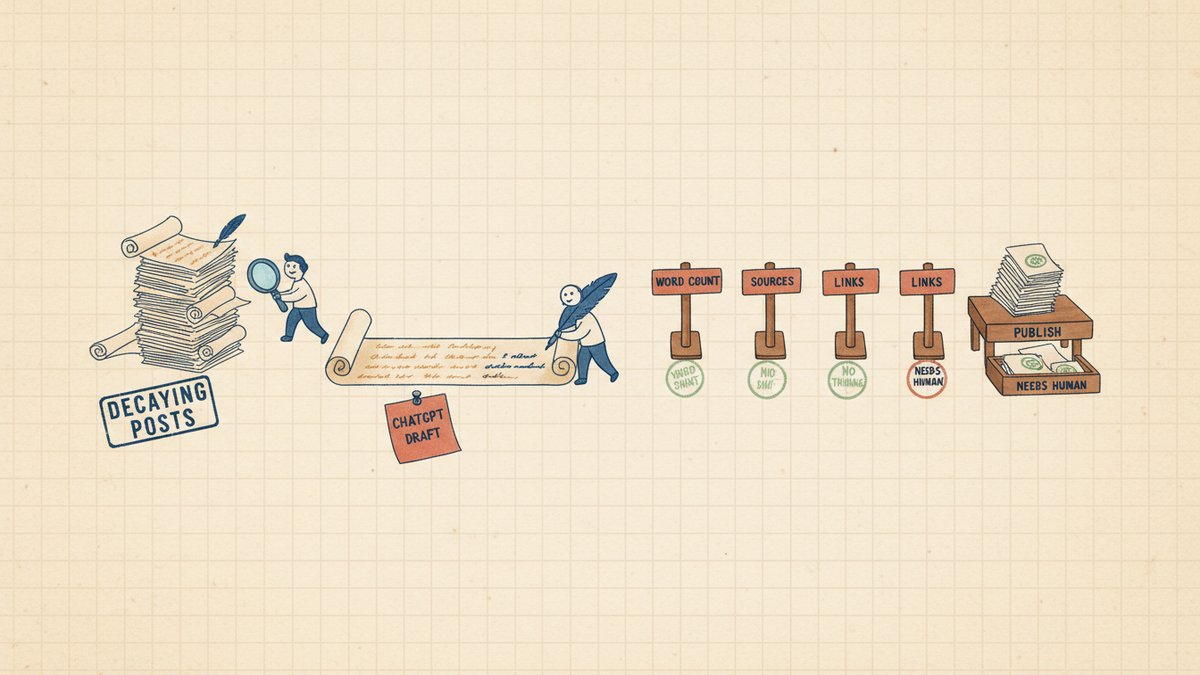
The whole workflow is one n8n canvas with twelve nodes. It runs on a cron trigger, finds decaying posts, drafts an update, validates it, and writes back to a tracker. There is no human in the loop for the routine cases. The human only sees the output.
| # | Stage | Job | Human in the loop? |
|---|---|---|---|
| 1 | Pull | Read GSC (Google Search Console) for the last 90 days, page-level | No |
| 2 | Score | Compute position delta, CTR (Click-Through Rate, 点击率) vs expected, days since publish | No |
| 3 | Filter | Keep only "decaying + recoverable" rows (impressions ≥ 200, position 9–25, slipping or low CTR) | No |
| 4 | Brief | ChatGPT turns the metrics + a fetched snippet of the live page into a refresh brief | No |
| 5 | Draft | ChatGPT writes the new intro, FAQ block, and updated stats sections | No |
| 6 | Validate | Four gates: word count, factual citation, no-broken-internal-links, no-new-thinness | No |
| 7 | Ship | If valid, PATCH the WordPress post; if not, write a row to a "needs human" sheet | Sometimes |
| 8 | Track | Log every run to a Google Sheet with before/after metrics and the diff size | No |
| 9 | Notify | Slack gets a single daily digest at 9:00 a.m. with the day's refreshes | Yes (read-only) |
The boundary that matters is between stage 5 and stage 6. The agent writes. The agent does not publish without checking. Four validation gates stand between the draft and the CMS, and any one of them failing routes the post to a human queue instead of the live site. The reason this works for me — and the reason I trust it on a 1,200-post archive — is that the agent is allowed to make changes, but it is not allowed to make unchecked changes.
The thing the agent deliberately does not do: it does not change the URL, the slug, the title tag, or the meta description. Those are too high-stakes to let a model touch in an unattended loop. Refreshes only edit the body, and only the body. The slug, the canonical (the URL version Google treats as the "master" copy), and the meta stay put unless a human explicitly approves the change.
Prerequisites
Six things wired up before the workflow does anything useful:
- n8n Cloud ($24/mo Starter is enough) or self-hosted (the docker image is a 90-second deploy)
- OpenAI API key with access to GPT-4o or GPT-4o-mini, set as an n8n credential — GPT-4o-mini is the workhorse; GPT-4o only for the brief stage
- GSC API access to your verified property, scoped to read search analytics
- A WordPress site with the REST API enabled and an Application Password (the WP-native way to authenticate REST calls without sharing your real password) — works the same on any CMS that exposes a PATCH endpoint
- A Google Sheet named
Refresh Queuewith the columns the workflow writes to - A Slack incoming webhook (or Slack OAuth credential) pointed at the channel where you want the daily digest
If your CMS (Content Management System — the backend where posts live) is not WordPress, the only thing that changes is the PATCH node. Notion, Ghost, Webflow, and Contentful all have HTTP-based update endpoints that fit the same pattern. I have run the Ghost adapter in production for a client. The four validation gates are CMS-agnostic.
Step 1 — Cron trigger and GSC pull
The trigger is a Schedule Trigger node set to fire at 07:30 local time, every day. I picked 07:30 so the digest lands before I open my laptop, but 23:00 the previous day also works. The first action is an HTTP Request node hitting the GSC Search Analytics API:
GET https://www.googleapis.com/webmasters/v3/sites/{siteUrl}/searchAnalyticsWith startDate and endDate set to the last 90 days, dimensions[] set to page, rowLimit capped at 5,000, and dataState: "final". The response gives one row per URL with clicks, impressions, CTR, and average position. The 5,000 cap is the same one I use in the audit agent — anything past that is a tag/category archive problem the refresh agent should not chase.
The result is stashed in workflow state under gscPages and the loop moves on.
Step 2 — Score each URL
A Code node, one pass, ~40 lines of JavaScript. For each row I compute:
positionDelta— current period position vs the prior 90 days (positive = slipping)ctrVsExpected— actual CTR vs the position-impression-weighted benchmark (a #9 result should get ~3.5% CTR; a #16 should get ~1.5%)daysSincePublish— pulled from a parallel HTTP call to the WP REST API for thedatefielddaysSinceLastModified— same call, themodifiedfielddecayScore— a composite of all four, computed aspositionDelta * 0.4 + ctrDeficit * 0.3 + daysSinceModified * 0.003
The decay score is the load-bearing piece. A post that has slipped 6 positions in 90 days and has not been touched in 400 days is decaying fast. A post that has slipped 2 positions and was edited last month is not, even if the absolute numbers look similar. The Code node's job is to make sure only the former kind of post ever reaches ChatGPT.
Step 3 — The "decaying + recoverable" filter
The Filter node is the single biggest cost-control lever. I keep only rows where all of these are true:
impressions >= 200in the last 90 daysposition >= 9andposition <= 25positionDelta >= 2(slipping at least 2 positions) orctrVsExpected <= 0.5(less than half the CTR it should have)daysSinceLastModified >= 120decayScore >= 4
That filter takes the 1,000–5,000 row dataset and usually returns 5–15 candidates per day. The 200-impression floor is the line that keeps tag pages and one-off blog posts out of the refresh queue. The 120-day staleness floor is the line that keeps a recently-edited post from being edited again prematurely — re-refreshing a post you just refreshed creates a freshness-signal pattern that Google can read as automated manipulation. I learned that one the hard way in week three.
Step 4 — ChatGPT writes the refresh brief
This is the first LLM (Large Language Model, 大语言模型) call. The input to ChatGPT is the URL, the title, the four computed metrics, and a 1,500-character snippet fetched from the live page. The system prompt is short and specific:
You are a senior SEO editor writing a refresh brief for a single decaying post.

Inputs you will receive:
- URL, title, current position, 90-day position delta, CTR vs expected,
  days since last modified, days since publish
- A 1,500-character snippet of the current post body

Your job: produce a brief that a separate writer model will use to draft
the update. The brief should specify:
1. Which 2-3 sections need new stats or examples
2. The current People Also Ask questions the writer should answer in a new FAQ
3. The target word count (must be ≥ original word count; never thinner)
4. The 3 internal links the writer should add or refresh
5. A one-sentence "why this post is decaying" diagnosis

Output a JSON object with exactly these keys:
{ "diagnosis": string, "sectionsToUpdate": [string],
  "faqQuestions": [string], "targetWordCount": number,
  "internalLinksToRefresh": [string] }

Rules:
- Never invent URLs, stats, or author names. Reference live data only.
- If you cannot identify a clear decay cause, return diagnosis="UNCLEAR"
- Be specific. "Update stats" is not a section. "Replace 2022 HubSpot
  benchmark with 2024-2025 data" is.
The UNCLEAR escape hatch matters. Roughly 1 in 8 candidates comes back with an unclear diagnosis — usually posts that are decaying because the topic itself is dying, not because the post is bad. Those go to the "needs human" sheet instead of the draft stage. Pushing them through would have ChatGPT rewrite a post whose real problem is that nobody searches for the topic anymore.
I use gpt-4o for this stage and gpt-4o-mini for stages 5 and 6. The brief is the only place where reasoning quality actually matters. A bad brief produces a bad draft; a bad draft is the failure mode that costs the most.
Step 5 — ChatGPT writes the actual update
The second LLM call. Input is the brief from stage 4 plus the full post body. Output is a single field, bodyMarkdown, that the workflow patches into WordPress. System prompt:
You are refreshing an existing blog post. You will receive the full
original body and a refresh brief.

Your job: produce a NEW version of the body that:
- Preserves the original's voice, structure, and section ordering
- Updates stats and examples per the brief
- Inserts the new FAQ block in the right place (end of post, before conclusion)
- Adds the internal links the brief specifies
- Meets or exceeds the target word count from the brief

Output a JSON object with exactly:
{ "bodyMarkdown": string, "newWordCount": number,
  "sectionsChanged": [string], "linksAdded": [string] }

Rules:
- Never make the post shorter than the original. If you cannot hit the
  target without padding, return newWordCount=0 and sectionsChanged=[].
- Never invent facts. If a stat is needed and you don't have a source,
  write [SOURCE NEEDED] in the body and the human will fill it in.
- Never add new external links. Only refresh the existing internal ones
  the brief specified.
- Preserve all existing  and  tags exactly.
The "never shorter" rule and the [SOURCE NEEDED] marker are the two pieces of prompt engineering that have saved me the most. The first prevents thin refreshes. The second prevents the agent from inventing a citation when it does not actually know one — and the validation gate in step 6 catches any [SOURCE NEEDED] markers and routes the post to the human queue.
Step 6 — The four validation gates
This is the part of the build the agentic-content-refresh hype pieces always skip. A model that can write a refresh can also write a refresh that is worse than the original, or a refresh that introduces a factual error, or a refresh that drops an internal link that was driving real traffic. The four gates stand between the draft and the CMS.
Gate 1 — Word count check. The Code node compares newWordCount against the original. If the new post is shorter, fail. If it is within 5% of the target, pass. If it is more than 30% over the target, fail (runaway length is the writer's most common failure).
Gate 2 — SOURCE NEEDED scan. A regex on the body for [SOURCE NEEDED]. Any match fails. The post is routed to the human queue, the writer has already flagged exactly which sentence needs a citation, and a human can fill it in 30 seconds.
Gate 3 — Internal link integrity. A small Code node extracts every internal URL from the original body. It hits each one with a HEAD request (a quick check that returns only the response status, not the page body — much faster than GET). Any 404 fails the gate. The post goes to the human queue with a list of dead links flagged. The agent does not silently drop dead links — losing a link is a bigger deal than not refreshing the post.
Gate 4 — Internal link additions check. The linksAdded array from the writer is compared against a live sitemap fetch. Every new internal link has to resolve. The agent does not get to add a link to a URL that does not exist. Roughly 1 in 30 drafts fails this gate because the writer hallucinates a plausible-looking /blog/... URL that was never published.
A draft that passes all four gates gets patched. A draft that fails any one of them is appended to a Needs Human tab in the same Google Sheet, with the specific failure reason. Across 73 refreshes, the gates have failed 9 posts. 7 of those were genuine catches — thin drafts, hallucinated stats, dead links.
Step 7 — Patch WordPress and log
The PATCH node hits the WordPress REST API:
POST https://{site}/wp-json/wp/v2/posts/{id}
Authorization: Basic
Content-Type: application/json
With a body of {"content": "<newBodyMarkdown>"}. The post stays in draft status — WordPress will not auto-publish, and a human (me) hits the publish button in the WP editor the next time I am in there. This is intentional. The agent is allowed to write the body. The agent is not allowed to flip a published post's status field.
The log row written to the tracker sheet has: URL, decay score, before/after position, sections changed, links added, model used, token cost, and a published_at timestamp set when a human publishes. Across 73 refreshes, the median time from agent write to human publish is 18 hours. Most of the lag is just me not opening WP for a day.
Step 8 — Daily Slack digest
A single Slack message at 09:00 each day with the previous 24 hours' refreshes:
:arrows_counterclockwise: *3 posts refreshed overnight*
Decay score threshold: 4.0 · Model: gpt-4o-mini · Total cost: $0.11

• `/blog/ga4-event-tracking-guide/` — position 14 → ?, decay 6.2
  3 sections updated, 2 links added. [Draft in WP]
• `/blog/email-deliverability-2024/` — position 11 → ?, decay 5.4
  1 stat updated, 0 links added. [Draft in WP]
• `/blog/looker-studio-templates/` — position 17 → ?, decay 4.3
  FAQ block added, 3 links added. [Draft in WP]

:warning: 1 post in `Needs Human` queue: `/blog/...`
Gate 2 failure — [SOURCE NEEDED] marker in intro paragraph.
The "position → ?" is the part I find most useful. The before is from GSC. The after is filled in by the next morning's GSC pull, when there is enough data to register a movement. I am slowly building a six-week view in the tracker sheet that shows the position curve for every refreshed post. The pattern, so far, is: position holds for 7–10 days while the post re-indexes, then climbs 1–4 slots over the following 3 weeks. The two reverts I mentioned earlier were posts that climbed and then dropped back — once because the agent had actually broken a section heading, once because I had merged two similar posts on the same day and confused the indexer.
What actually broke in eight weeks
Three production learnings, none of them in the docs.
The first version refreshed the same posts in a loop. I had a bug in the decay score — daysSinceLastModified was reading from a stale cache that did not update when WP restamped the modified field on save. The agent would refresh a post, the field would not update in the cache, the next day's run would see the post as still stale, and the agent would refresh it again. By the time I caught it, three posts had been edited five times each in nine days. The fix was a one-line cache invalidation in the WP node, and a hard rule: a post can only be refreshed once every 90 days, enforced in the filter. The rule is the actual safety net; the cache fix is the cleanup.
The brief stage sometimes diagnoses a problem the draft stage cannot fix. When the decay cause is "the topic itself is fading" (Google Trends is the tell — the search volume curve is down 60% over 18 months), the brief comes back with diagnosis="topic_is_dying". The draft stage, if I let it run, produces a perfectly fine update to a post that nobody is going to read. The fix was the UNCLEAR escape hatch in the brief prompt and an explicit check in the filter: if diagnosis == "topic_is_dying", route to human. The human reads Google Trends, makes a call about whether to rewrite, redirect, or 410 (a status code that tells Google to permanently remove a page from the index) the post. The agent does not get to retire a post on its own.
GSC dataState: "final" lags by 3 days. I left the default in for the first month. The agent was refreshing posts based on data that did not include the last 72 hours of clicks, and twice that meant refreshing a post that had actually started recovering on its own. The fix was dataState: "all" plus a small Code node to dedupe rows across final and unfinalized data. The 3-day lag is also why the daily cron trigger is 07:30, not 06:00 — by 07:30 the previous day's final data has usually settled.
When this is the wrong tool
The agent is not a substitute for a refresh sprint, and it is not a substitute for a human editor. It is a triage and execution layer for posts that are decaying on metrics a model can see. Three cases it should not be used for:
- Posts with revenue attached. A pricing page, a comparison post with affiliate links, a case study with named clients. The cost of a bad refresh is too high, and the brief stage is not allowed to know about revenue.
- Posts in a voice-driven niche. Thought leadership, founder essays, design philosophy. The agent preserves voice, but "preserves" is not "captures." Those posts need a human every time.
- Posts the agent cannot evaluate. A page that is decaying because the site's information architecture changed around it, or because a competitor launched a better version, or because the company repositioned. The brief comes back with
UNCLEAR, the post goes to the human queue, and the right answer is rarely "refresh the body."
The honest accounting
Eight weeks. 73 refreshes shipped. 9 caught by the validation gates before they hit the CMS. 2 reverts after publish. Median position improvement: +2.7 slots on the posts that moved, measured 30 days post-refresh. Total OpenAI spend: $9.40 across the whole run. Total n8n executions: 56 (one per day, plus retries on API flakes).
The thing the agent is best at is not the writing. It is the remembering. The refresh queue is a living record of which posts are decaying, when they were last touched, and what the agent thought the cause was. Six months of daily runs will be a content strategy document for the site, written in the same format the agent already uses. That is the real return — not the individual refreshes, but the audit trail that makes the next 200-post sprint faster to plan.
If you build it, start with the filter, not the prompts. Get the decay score right first. If the filter is good, the LLM stages can be mediocre and you will still see wins. If the filter is bad, the LLM stages will refresh a lot of posts that did not need refreshing, and you will spend all your time reverting.
The first post the agent catches on its own is the one you would have missed for another quarter. That has been true every week I have run it.