Microsoft 365 Copilot Premium for Marketers: 4 Jobs Only It Can Do (And the Real Cost Per Seat)
Contents
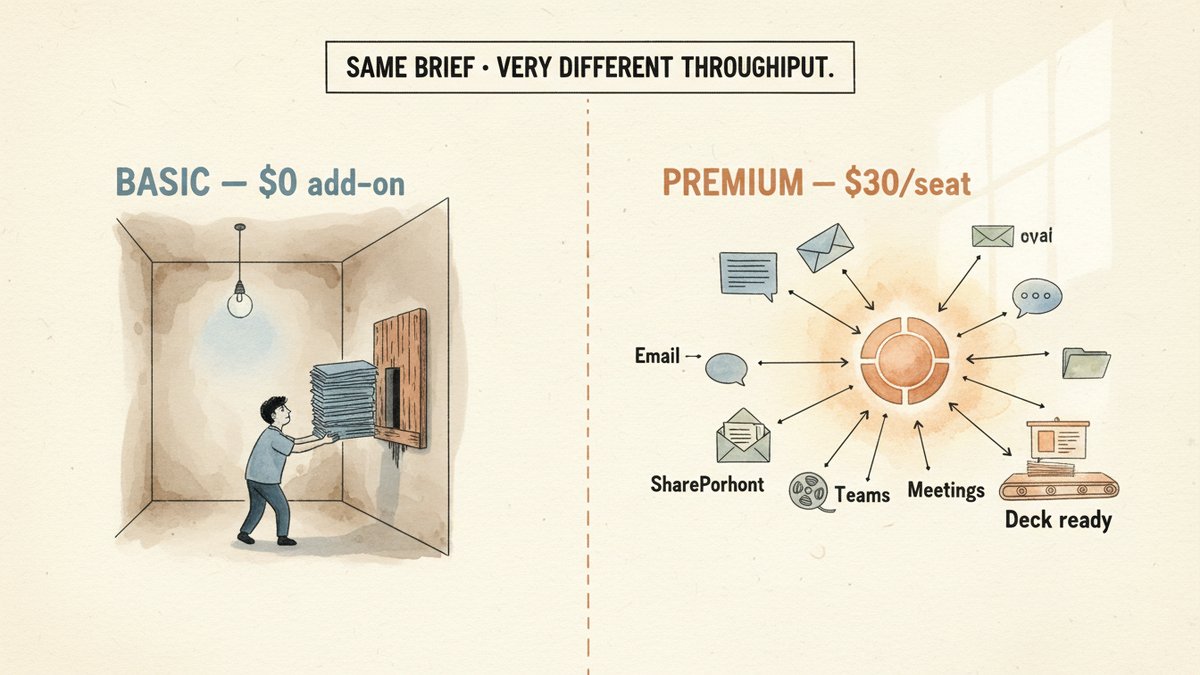
Last Tuesday I ran the same campaign post-mortem brief through two Copilot tiers. The first — Basic, which now ships free inside Word, Excel, and PowerPoint for orgs under 2,000 seats — produced a serviceable one-pager after I'd pasted each data point in by hand. The second — Premium, the $30-per-seat add-on — produced a 14-slide deck, an executive summary, and a Q3-vs-Q4 trend chart while I made coffee.
The wall between them isn't about prompt skill or "better prompting." It's about whether Copilot can read your actual work — emails, meeting notes, customer interviews, the HubSpot pipeline — without you feeding it file by file. For a marketing team, that difference is the entire upgrade question.
The naming mess (read this first)
Microsoft sells at least four Copilot SKUs right now, and the labels keep shifting. Before you decide whether Premium is worth the spend, you need to know which one you actually have access to:
| Tier | What it is | Who gets it | Cost |
|---|---|---|---|
| Copilot Free | Web/Edge/mobile personal AI | Anyone with a personal Outlook.com account | $0 |
| M365 Copilot (Basic) | In-app Copilot Chat in Word, Excel, PowerPoint, OneNote, Outlook — web-grounded, GPT-5.4/5.5 reasoning | Unlicensed M365 users in orgs under 2,000 seats (rolled out April 15, 2026) | $0 add-on (requires base M365) |
| Copilot Chat (Basic) | Basic in the M365 Copilot app and Outlook only — no in-app Copilot inside Word/Excel/PowerPoint/OneNote | Unlicensed users in orgs over 2,000 seats | $0 add-on (requires base M365) |
| M365 Copilot (Premium) | The paid add-on — adds Microsoft Graph/Work IQ grounding, Researcher + Analyst agents, Cowork, priority access, Teams meeting facilitation | Any org with eligible base plan | $30/user/mo (300+ seats) or $18/user/mo promo under 300 seats through Dec 31, 2026 (then $21) |
If you're on M365 Business Premium or E3/E5, you've had "Basic" Copilot Chat free inside your Office apps since late 2025. The question is whether the Premium tier adds enough that you'll actually feel.
What Premium actually buys you
Here's the head-to-head on the dimensions a marketing team touches daily:
| Feature | Basic | Premium |
|---|---|---|
| Web-grounded answers (GPT-5.4/5.5) | Yes | Yes |
| Standard access (throttled under load) | Yes | Priority access |
| Reads the open file + uploaded files | Yes | Yes |
| Reads emails, Teams chats, meetings, SharePoint, OneDrive across your tenant | No | Yes (Work IQ) |
| Researcher agent (multi-source synthesis → PPT/PDF/infographic/audio) | No | Yes |
| Analyst agent (Python in Excel, reasoning over data) | No | Yes |
| Copilot Cowork (end-to-end agent execution, GA June 2026) | No | Yes |
| Meeting facilitation in Teams | No | Yes |
| Highest usage limits | No | Yes |
| GPT-5.5 Thinking + Anthropic Claude model choice | No | Yes |
The "reads your work content" row is the whole ballgame. Without it, every Copilot session starts from a blank page and whatever you paste. With it, Copilot already knows your Q3 plan, last week's customer interview transcripts, the post-mortem from the campaign that flopped in May, and the Slack thread where sales complained about lead quality.
4 jobs only Premium can do for a marketing team
1. Turn a folder of customer interviews into a deck in one shot
With Basic, you're pasting 20 transcripts into the chat one at a time, asking for summaries, then re-feeding those summaries into PowerPoint. With Premium, you point the Researcher agent at the SharePoint folder, ask for "5 cross-cutting pain points with verbatim quotes," and come back to a structured report — and with one click it converts to a 12-slide deck or an audio overview for the leadership meeting. This is the single time-saver that justifies the seat cost for anyone running voice-of-customer work (it's the same multi-interview synthesis NotebookLM handles well — Researcher just does it natively inside your M365 tenant, with your real SharePoint folders and Teams transcripts).
2. Reason over campaign data, not just chart it
Analyst agent runs Python in Excel against your uploaded CSVs. The difference matters: Basic can build a bar chart from a column you select. Analyst can ask "why did CAC spike in week 14," look across paid + organic + email in the same workbook, and return an explanation with the supporting rows cited. For anyone doing weekly performance reviews, that's the gap between "AI made my chart prettier" and "AI did the diagnostic I was going to do at 11 PM."
3. Draft in the actual voice of *this* company's prior work
Work IQ grounds every prompt in the last 18 months of your own content — sales decks, past post-mortems, internal newsletters, the brand style guide someone wrote in 2024. The output reads less like "AI trying to sound human" and more like "a new hire who's read everything." For agencies or in-house teams churning out 30+ assets a month, that grounding shaves 20-30% off the editing pass. Basic's "reads the open file" can't do that — it sees one document, not the corpus.
4. Hand off a multi-step task, not a prompt
Cowork (GA June 2026) is the agentic version of Copilot: you give it a goal like "audit this quarter's PMax asset performance and flag the bottom 10 creatives by spend efficiency," and it plans the steps, pulls the data, runs the analysis, and returns a finished brief. Powered by GPT-5.5 Thinking for reasoning tasks and Anthropic Claude for visual outputs like PowerPoint. Basic doesn't have Cowork. This is the feature most worth demoing before you buy.
The real cost math (the part nobody puts in the headline)
The $30/seat number is misleading. Premium is an add-on — it sits on top of a base Microsoft 365 plan. For a 10-person marketing team on Business Premium:
- Base plan: ~$22/user/mo (pre-July 2026 pricing; rising to $25 on July 1, 2026)
- Copilot Premium add-on: $30/user/mo
- Real cost: ~$52/user/mo → ~$6,240/year for 10 seats
For a 50-seat agency on E3 + Copilot Premium, you're closer to $69/user/mo all-in → $41,400/year. The Forrester Total Economic Impact study Microsoft commissioned estimates 116% ROI over three years for enterprises, but those numbers assume an enterprise-sized deployment. For a five-person team running three campaigns a quarter, the math is much harder to defend.
Verdict: who should pay, who shouldn't
Skip Premium if:
- You're a solo marketer or a team under five
- Your work is mostly single-document drafting (one blog post, one deck at a time)
- You already pay for ChatGPT Team/Plus and use it as your primary AI surface
- Your M365 tenant is over 2,000 seats and you only need Basic's Word/Excel/PP chat
Buy Premium for:
- Anyone running weekly campaign diagnostics or PMax reviews (Analyst earns its place here)
- Voice-of-customer, customer research, or interview-led content workflows (Researcher)
- Agencies juggling 5+ client content calendars (Cowork + Work IQ together)
- Marketing ops roles that own quarterly planning decks (Work IQ grounding alone is the unlock)
The middle path: buy Premium for the 2-3 seats that need it most (typically the marketing lead, the content strategist, and the analyst) and keep the rest on Basic. Most teams I've talked to land on 25-40% of seats on Premium, not 100%. Microsoft's pricing model expects broad adoption; the actual value is concentrated.
The upgrade isn't a productivity tax on every employee. It's a multiplier on the people whose work touches synthesis across the corpus — and on a 5-person marketing team, that's usually two seats, not five.