Lifecycle automation mapping: use AI as your email strategist — design 5-stage nurture flows in a single Claude session
Contents
A few weeks ago I was staring at a Miro board at 11pm, dragging sticky notes around a 5-stage flow for a DTC (direct-to-consumer, 直接面向消费者) skincare client. Three weeks of work, two client meetings, and the welcome series was still arguing with itself. Out of curiosity I opened Claude, dumped the brief into a single prompt, and asked for the full map.
Twenty minutes later I had a draft I would have spent a day and a half producing by hand. It wasn't perfect — it got the offer stack wrong, and it tried to put seven emails into a welcome series when four is the right number for an SMB (small and medium business) skincare brand. But the skeleton was right. The five stages lined up. The trigger logic between them was sound. I spent the next hour editing, not building.
That session saved me roughly ten hours of structural work on that one flow. Since then I've run the same session for two B2B SaaS clients and a subscription snack brand. The last B2B flow I shipped using this scaffold converted trial-to-paid at 14.3% over 60 days — the previous hand-mapped version was 11.8%. The lift came from getting more branches and exit conditions on the page faster, not from AI writing better strategy than I would have.
It also changed how I think about using AI for strategy. Most marketers I know use Claude as a writer. The bigger win is using it as a co-strategist — a thinking partner that helps you map a flow before you ever open your ESP (Email Service Provider — 邮件营销平台).
This post walks through the exact session I run when I'm building a lifecycle automation. Same five stages, same prompt scaffold, same set of pushback questions. It works for ecommerce, SaaS, and most B2B products with a defined ICP (Ideal Customer Profile — 理想客户画像).
The 5 stages, in one paragraph each
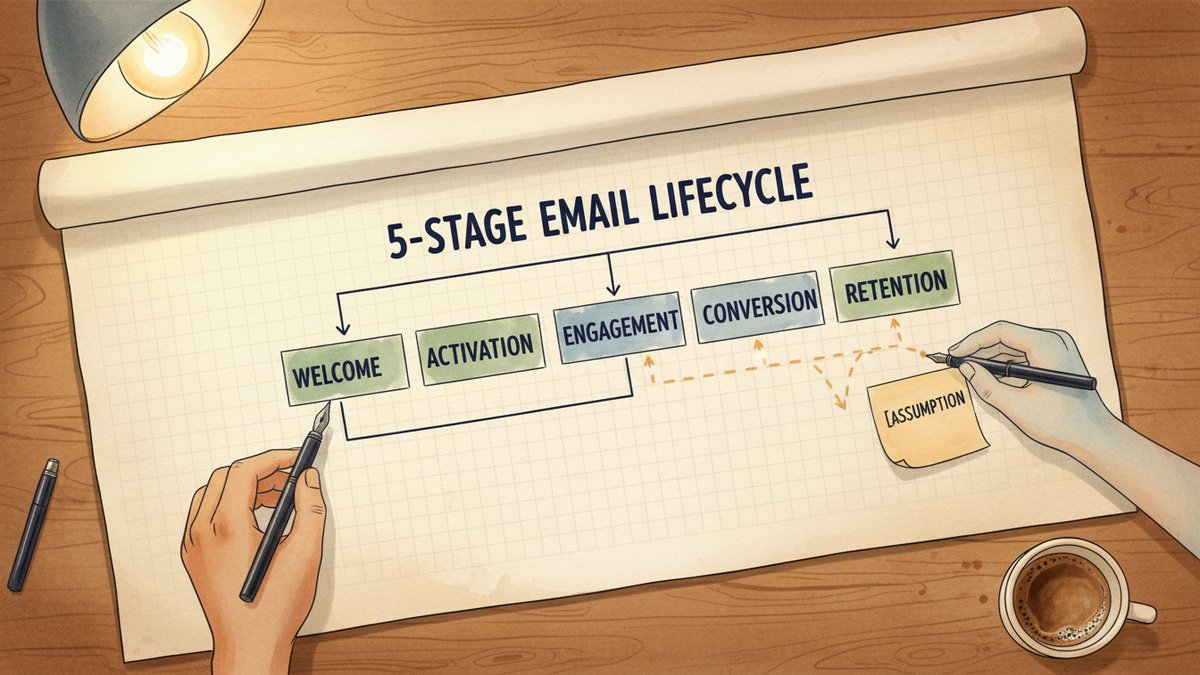
Before you touch a prompt, lock the framework. The five stages are the same shape regardless of industry — only the definitions of "active" and "converted" change.
- Welcome — Triggered by signup or first purchase. Job: confirm the decision, set expectations, deliver the first value moment.
- Activation — Triggered by signup but time-delayed, or by the first qualified action. Job: get the user to the aha moment — first project, first save, first repeat order, first meaningful metric.
- Engagement — Triggered by usage signals (login, feature use, repeat purchase). Job: deepen the habit, expose them to the next value tier.
- Conversion — Triggered by qualified intent (cart abandon, pricing page view, demo request). Job: remove friction, handle objections, close.
- Retention — Triggered by drop-off (lapsed purchase, declining usage, churn risk score). Job: bring them back, or extract learning if they won't return.
If your stage definitions are vague, AI will paper over it. Spend ten minutes writing the trigger and the job-to-be-done for each stage. Don't move on until it's specific. "Engagement" with no signal and no job is the single most common reason lifecycle maps turn into 40-email monstrosities that underperform.
The Claude session, step by step
I run this in one continuous conversation, usually inside a dedicated project. Three messages do the heavy lifting. Everything else is iteration.
Message 1 — Set the stage
This is the brief. I paste the client's context, the stage definitions, and the constraints. Here's a redacted version of what went in for that skincare client:
You are a senior lifecycle email strategist. We're mapping a 5-stage
nurture flow for a DTC skincare brand. Audience: women 28-45, AOV
(average order value, 平均客单价) $48, repeat purchase cycle 6-8 weeks.

Five stages with triggers and jobs:
1. Welcome — signup. Job: confirm + set expectation + deliver lead
   magnet value.
2. Activation — first purchase OR quiz completion. Job: get the second
   purchase inside 8 weeks.
3. Engagement — repeat open or site visit. Job: surface UGC (user
   generated content, 用户生成内容) and routine-building content.
4. Conversion — cart abandon, product page revisit. Job: close.
5. Retention — 90 days no purchase. Job: reactivate or harvest
   preference data.

Constraints: max 4 emails in Welcome, 3 in Activation, 2 in Engagement,
Conversion is dynamic, Retention is 3 emails over 14 days. Brand voice:
warm, evidence-led, no "OMG" energy. Output: a table with email #,
trigger, subject, body angle, send time, and exit criterion.
Two details matter. First, the role and the artifact. "Senior lifecycle strategist" sets the depth. "Output: a table with X columns" stops Claude from writing 800 words of prose per stage, which it loves to do. Second, the constraints. The 4-3-2-3 cadence is a hard call I made before the prompt — based on the brand's list size and historical engagement. Without that line, Claude will default to whatever the largest marketing blogs recommend, which is usually 7 emails in a welcome series. That's right for enterprise, wrong for SMB.
Message 2 — Push back
The first output is the draft. It's almost always too long and too generic. My second message is designed to make Claude defend its choices, not just produce more.
You gave us 6 emails in Welcome. We said max 4. Cut two — the ones with
the weakest job-to-be-done. Also: the Activation flow's third email is
basically a duplicate of Welcome #3. Either differentiate or kill it.

For Conversion, you put a 10% off in email 1. That's a margin problem
for $48 AOV. Replace with a bundle recommendation and a 48-hour
urgency frame. Same conversion intent, lower cost.
This is where AI does something useful that a static template can't: it reasons about my objection and revises. If I had a junior strategist, I'd have to walk them through why the constraint exists. With Claude, I can state the constraint and trust it to recompute.
One habit that pays off: copy-paste Claude's offending output back at it as evidence. The model is much better at revising a specific paragraph it just wrote than at revising a vague "make it better" instruction. This is a small thing that doubles the quality of the second pass.
Message 3 — Extract the decision logic
The third message is the one most people skip, and it's the one that pays for the session. I ask Claude to surface the branch points and exit conditions I didn't write down — the decision logic that turns five linear tracks into an actual system.
List every decision point in this flow. For each one, name:
- The signal that triggers the branch
- The branch the user goes down
- The condition that exits the branch and returns them to the main flow

Be specific. If a branch is speculative, mark it [ASSUMPTION] and tell
me what data I'd need to validate it.
For the skincare client, this surfaced four branches I hadn't drawn: quiz-completion users skip Welcome #2 (they already have the lead magnet equivalent), repeat purchasers within 14 days skip the entire Activation flow, the Retention flow's email 3 should split on whether the user ever opened email 1, and Engagement email 2 should suppress if the user has hit a recent Conversion email in the last 7 days. Each of those branches was a 30-minute debate with the client in my old workflow. Claude gave them to me as a list, with one marked [ASSUMPTION] and the validation data I would need.
What AI is good at, and where it lies
The map is the easy part. The hard part is knowing when to disagree. Three failure modes to watch for:
Over-segmentation. Claude will invent micro-segments to feel thorough. "Power users in tier 1 cities with two repeat orders in the last 30 days" sounds smart. You have 84 of them. Don't build a flow for 84 people. Force it to collapse segments until each one has at least 1,000 users in your list, or 10% of the trigger volume — whichever is smaller. If a branch can't meet that bar, kill it.
Wrong offer stack. AI doesn't know your margins, your inventory, or what the merchandising team is willing to support. The flow is the bones; the offers are the muscle. Always have a human own the offer stack. I'll let Claude suggest offers in the table, but I cross every one against a spreadsheet before any of it ships.
Vanity cadence. Claude defaults to email frequency that suits a HubSpot benchmark, not your list's actual tolerance. If your last three campaigns' unsubscribe rate averaged 0.4%, a daily email for a week is going to burn you. Pull your own engagement data, not the AI's defaults. This is the most expensive mistake in the post — I've seen a single over-eager welcome flow cost a brand 6% of their active list in a quarter.
The output you actually use
The deliverable from this session is a single document, not five separate ones. Format:
- One table per stage (email #, trigger, subject, body angle, send time, exit criterion)
- A "branches" appendix with the decision points from Message 3
- A "watch list" of three to five metrics to monitor post-launch — typically activation rate at day 14, time-to-second-purchase, and unsubscribe rate by stage
I drop this into the ESP as the build spec. Each email's copy gets a brief separately — usually written with Claude in a second pass, using the stage's brand voice and the email's specific job. The strategy and the copy are different artifacts and they want different prompts. Trying to do both in the same session usually ends with a strategy that's actually a draft of email #1 in disguise.
A note on what this doesn't replace
The session gets you a 70% draft in 20 minutes. The other 30% is the part where the email is a real, situated, on-brand artifact — voice calibration, a specific anecdote, an offer that actually works in the cart today. AI doesn't know that your client's site is in the middle of a homepage redesign, or that the lead magnet PDF is being rewritten. Those are conversations, not prompts.
Use the session to compress the structural work. Use the human hours to get the parts only the human can get right.
If you've never run a session like this, take one real flow you shipped in the last six months. Run the prompt above against it. Compare Claude's first draft to what you actually shipped. Where did you agree? Where did you diverge? The divergences are usually the parts of the work that are most specific to you — the offer stack, the brand voice, the quirks of your ESP — and that's a useful map of where your judgment is hardest to replace. It's also, incidentally, where your leverage as a strategist actually lives.