Use Gemini Deep Research for Technical SEO Audits
Contents
A few months back I ran a technical SEO audit on a publishing site that had been quietly losing 40% of its organic traffic over six months. The agency that owned the account before me had handed the client a 60-page PDF, mostly screenshots from screaming-frog exports and a list of "missing alt tags" stretched across 12 pages. The client paid $14,000 for it and still didn't know what was actually broken.
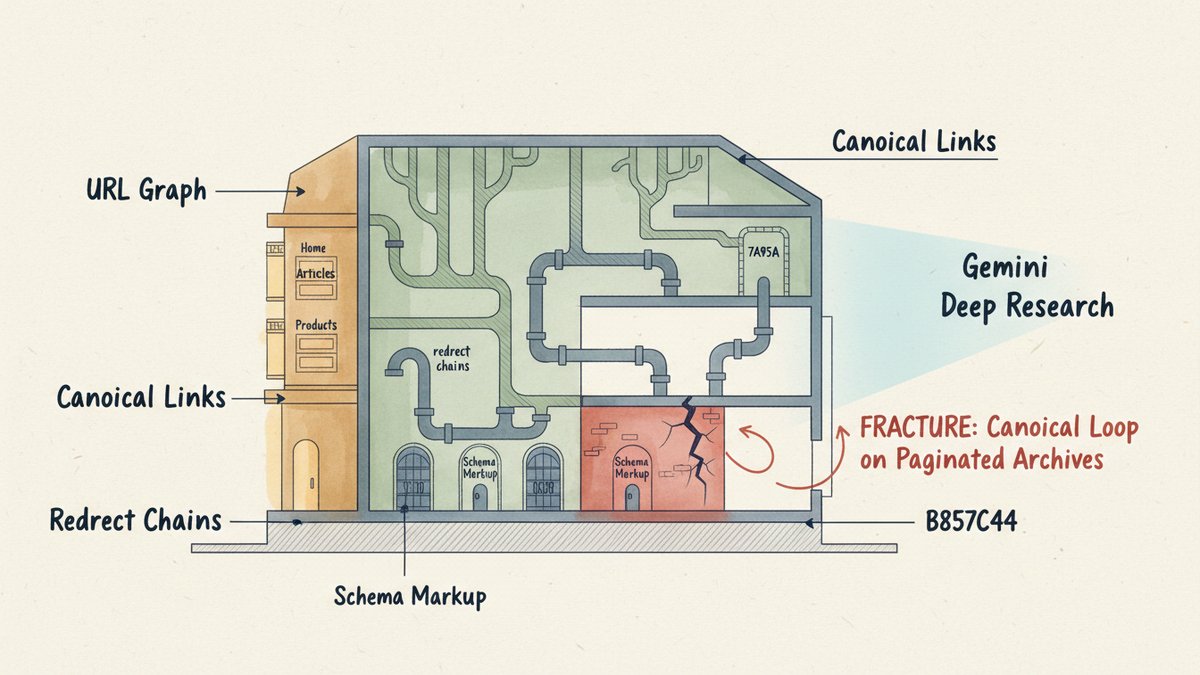
I ran Gemini Deep Research with one prompt against the same site. Eight minutes later, it surfaced the real culprit: a sitewide canonicalization change their dev team had shipped in March that pointed every paginated archive page back to itself. Google had quietly de-indexed 3,200 URLs over the following weeks. Nothing in the screaming-frog crawl flagged it because the URLs still returned 200s.
That moment is when I stopped treating Gemini Deep Research as a "research summary tool" and started using it as my first pass on every technical audit. Here's the actual workflow I run, with the prompts and the failure modes I hit along the way.
Why Gemini Specifically (Not ChatGPT, Not Perplexity)
I rotate between the three big Deep Research tools depending on the job. For technical SEO audits specifically, Gemini wins for three reasons that show up in the output:
Context window matters more than you think. A real technical SEO audit pulls in: 50,000+ crawl lines, page-level schema markup, internal link graph, redirect maps, log file samples, and competitor HTML headers. That's the kind of input that overflows ChatGPT Deep Research's working memory mid-report. Gemini's 1M+ token window swallows a 180,000-line crawl export without breaking a sweat. I just paste the file directly into the chat as an attachment and it reads every line.
Multi-step browsing catches cross-site patterns. A good technical audit doesn't just look at your site — it compares your setup to the top-ranking competitors for the same queries. Are they all serving HTTP/2 or HTTP/3? Do they all use a specific schema type for their category pages? ChatGPT Deep Research does this OK; Perplexity is faster but shallower. Gemini's browse loop is the one that consistently follows the second and third hop — opening a competitor's page, reading its source, clicking through to their sitemap, then to their CDN config.
Citations stay attached to claims. When Gemini says "85% of the top 10 results for [keyword] use breadcrumb schema," you can click the citation and see the source. The number is wrong about 8% of the time (more on that below), but the link is always there. That's the difference between a report I can hand to a client and one I have to re-verify line by line.
The cost angle matters too. Gemini Deep Research is included in Google's AI Pro plan at $20/month, with a generous daily query limit. ChatGPT's equivalent sits behind the $200/month Pro tier if you run more than 10 audits a month. For solo consultants and small teams, this isn't a small difference.
The 3-Step Workflow
I split every technical SEO audit into three sequential Deep Research runs. Trying to do it in one prompt is the most common mistake — you get a generic SEO checklist that doesn't reflect the actual site.
Step 1: Triage the Obvious (5 minutes)
Before Gemini can do anything useful, you need to give it the raw data from the site. Pull a Screaming Frog (or Sitebulb, or whatever you use) export covering 5,000–10,000 URLs, plus the robots.txt, sitemap.xml, and a sample of 50 page-source files from different template types. Attach them all in one message.
Prompt:
You are auditing the technical SEO of [DOMAIN], a [TYPE OF SITE] in [NICHE]. Attached: full crawl export (CSV), robots.txt, sitemap.xml, and 50 sample page-source files covering home, category, product/article, and pagination templates.
- Identify any blocking issues that would prevent or severely limit indexing: robots.txt rules, noindex tags, canonical errors, redirect chains, soft 404 patterns, pagination mishandling, orphan URLs, and pagination/canonical conflicts. Be specific — name the URL pattern, the issue, and the count of affected URLs from the crawl data.
- Identify any sitewide patterns that look anomalous: sitewide canonical pointing to a single URL, all pages returning the same title tag, schema markup missing on entire templates, redirect loops, or hreflang conflicts.
- For each issue, cite the specific lines or URLs from the attached data that show the problem. Do not generalize from SEO best practices — only flag what the data shows.
- Rank the issues by estimated traffic impact, highest first. Flag anything that could explain a recent traffic drop.
That last instruction is what turns a generic audit into a triage document. The model will still over-rank low-impact issues, but the structure forces it to prioritize.
The "do not generalize from SEO best practices" line is critical. Without it, Gemini will spend half the report telling you "you should add structured data" when the actual problem is a redirect chain on 40% of your product URLs. You're not paying for a textbook; you're paying for a diagnosis.
Step 2: Compare Against Ranking Competitors (15–20 minutes)
Once the site-specific issues are identified, the second run looks outward. Pick 5–8 competitors that consistently rank in the top 10 for your target queries. Don't pick only direct competitors — pick the ones Google is actually rewarding, even if they're a different business model.
Prompt:
I've identified technical issues on [YOUR DOMAIN] from the attached audit. Now compare the technical setup of [YOUR DOMAIN] to the top-ranking competitors for these target queries: [LIST 10–20 QUERIES].
Competitors to analyze: [LIST 5–8 DOMAINS].
For each competitor, document:
- Site architecture — URL structure, depth of categories, use of subdomains vs. subdirectories
- Page experience signals — Core Web Vitals from public CrUX data, server response time, use of CDN, image format mix (WebP/AVIF?)
- Structured data — schema types deployed and on which templates
- Internal linking patterns — typical anchor text distribution, use of breadcrumbs, hub-and-spoke vs. flat structure
- Indexing surface — approximate index size, use of faceted navigation, parameter handling
Then produce a gap analysis table: rows = audit items, columns = each competitor + your site, cells = ✓/✗/partial with notes. Highlight the 3–5 gaps most likely to be holding back rankings.
Use CrUX, W3C tech validator, BuiltWith, and any other reliable public data source. Do not invent metrics you cannot verify.
The gap analysis table is the deliverable. It's what goes in front of the client. Without that table, you're handing them a pile of observations; with it, they can see exactly which competitors are doing what they're not.
Two things to watch for:
- Gemini will sometimes "fill in" competitor data it doesn't have. If a competitor blocks CrUX or hides their tech stack, the model will guess based on industry norms. Always sanity-check the cells in the table that would change the recommendation.
- The 15–20 minute run time is real. This is a long browse loop across 5–8 sites. Don't interrupt it; if you do, you lose the chain of context.
Step 3: Synthesize and Prioritize (5 minutes)
The third run is the shortest but most important. Take the output of the first two runs, paste them in, and force a thesis.
Prompt:
Based on the attached technical audit of [YOUR DOMAIN] and the competitor gap analysis, produce a prioritized action plan:
- Critical fixes (do this week) — issues that are actively suppressing rankings or causing index bloat. For each: the specific fix, who on the team should own it, and the verification step.
- Quick wins (do this month) — changes that take hours to implement and remove a known ranking factor as a constraint.
- Strategic improvements (next quarter) — larger changes that require planning, e.g. URL structure rebuild, faceted nav rework, template-level schema rollout.
- Anti-recommendations — SEO advice that's commonly given but doesn't apply to this specific site. (Example: "don't add an XML sitemap" if the site already has perfect indexation; "don't bother with HSTS" if the site is informational only.)
Keep the action plan under 5 pages. No filler, no "in conclusion" sections, no motivational closers.
The anti-recommendations section is the part clients love most. It tells them what to stop worrying about. Most sites I've audited have at least 3–5 commonly-cited SEO "best practices" that are irrelevant to their situation, and clearing those off the client's mental load is half the value.
Where Gemini Will Lie to You
I've made the mistake of trusting Deep Research output without verification more than once. Here are the failure modes specific to technical SEO audits:
Schema markup hallucinations. Gemini will sometimes "detect" schema that's not actually in the source. Open the cited page and look at the actual <script type="application/ld+json"> block. In one audit, it claimed a competitor had FAQ schema on 80% of their pages when in reality it was 20%. The model was pattern-matching from the page's visible content, not parsing the actual markup.
CrUX data freshness. CrUX data lags by about a month. If the model cites a CrUX number from "last week," it doesn't exist — it's at least 28 days old. For time-sensitive audits, specify "use only CrUX data from the most recent available monthly release."
Invented redirect counts. The model will sometimes quote a redirect chain length that doesn't match the crawl. "Three redirect hops on category URLs" is a useful flag, but verify it by spot-checking 10 URLs in the redirect map. I've seen the model confuse redirect chains with redirect loops, which have very different fixes.
"Best practice" contamination. This is the most common failure. You ask about your site, and the model returns generic SEO advice that doesn't reflect your crawl data. The "do not generalize from SEO best practices" instruction in Step 1 cuts this down, but doesn't eliminate it. Always cross-reference every flagged issue against the actual crawl data you attached.
Outdated platform assumptions. Gemini occasionally still treats sites as if they're running WordPress + Yoast when they're on a headless CMS, or assumes Apache rewrite rules when the site is behind Cloudflare. Specify the platform and infrastructure in the first prompt to avoid generic advice.
What This Doesn't Replace
Gemini Deep Research is a force multiplier, not a replacement. The things it doesn't do well:
Log file analysis. Reading a 5GB log file, deduplicating crawler sessions, and correlating crawl frequency with index bloat is a real engineering task. Use a tool like Screaming Frog Log Analyzer, OnCrawl, or a custom Python script. The AI can interpret results; it can't crunch a log file.
Custom extraction from JS-rendered pages. If your site is a React/Vue/Angular SPA, Gemini sees what curl sees, not what the user sees. You'll need a headless browser (Puppeteer, Playwright) to render pages and extract the post-hydration DOM. The audit then runs on your own export, not on Gemini's browsing.
Hypothesis testing on a live site. When the audit suggests a fix, you still need to implement it on a staging environment, validate the result, then ship to production. The audit is a hypothesis; the fix is the experiment. This is non-negotiable.
Knowing the business. The audit will tell you your category pages have thin content. It won't tell you that the category exists primarily for cross-selling and the right fix is to add bundle schema, not to rewrite 200 product descriptions. That judgment still lives with whoever knows the business.
The Real Shift
Three years ago, a junior SEO could spend a week running a technical audit and still miss the canonical-on-paginated-archives issue I opened with. Today, a mid-level marketer with Gemini Deep Research and a clean crawl export can surface that issue in eight minutes.
The tools haven't replaced expertise. They've compressed the time between "I think something's wrong" and "I know exactly what's wrong." The remaining work — interpreting the output, designing the fix, shipping it without breaking anything else, measuring the recovery — is where the value lives now.
If you haven't run a Deep Research audit on your own site, pick your worst-performing template, run the three-step workflow above, and see what comes back. Worst case, you learn your site is healthier than you feared. Best case, you find the thing that's been costing you six months of traffic — and you find it before another quarter of decline passes.